Stream Logs from Vercel to SigNoz
If you are running your applications on Vercel, you can stream logs from Vercel to SigNoz using log drains.
Log Drains are only supported in Vercel Pro and Enterprise accounts.
Stream Vercel logs to SigNoz in SigNoz cloud
From the Vercel dashboard, go to Team Settings > Log Drains.
Select sources to collect logs
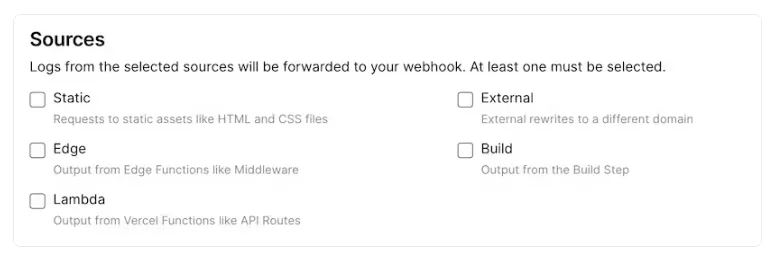
Choose delivery format as
JSONChoose your target projects
Enter the endpoint. It will be
https://ingest.<REGION>.signoz.cloud:443/logs/jsonDepending on the choice of your region for SigNoz cloud, the otlp endpoint will vary according to this table.
Region Endpoint US ingest.us.signoz.cloud:443 IN ingest.in.signoz.cloud:443 EU ingest.eu.signoz.cloud:443 Enable custom headers and add the headers
signoz-access-tokenandx-vercel-verifyThe value ofx-vercel-verifywill be visible on the screen andsignoz-access-tokenwill be the token you use for sending data to SigNoz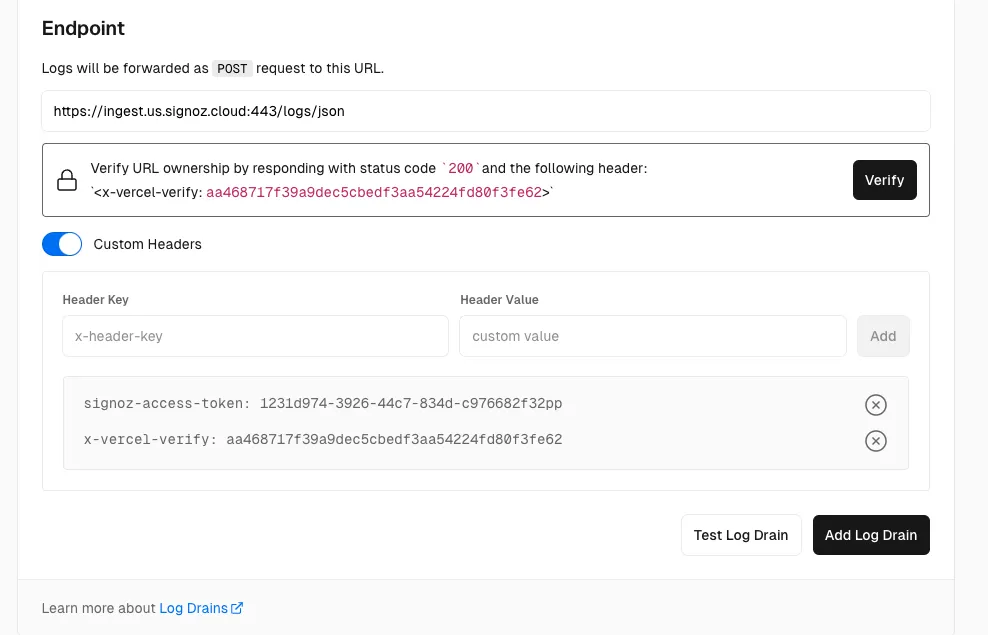
Click on
Test Log Drain, if successful you will see sample logs on SigNoz UI (Might take some time).
Click on
Verifybutton and thenAdd Log Drainin Vercel.
Now your logs will be sent to SigNoz.